

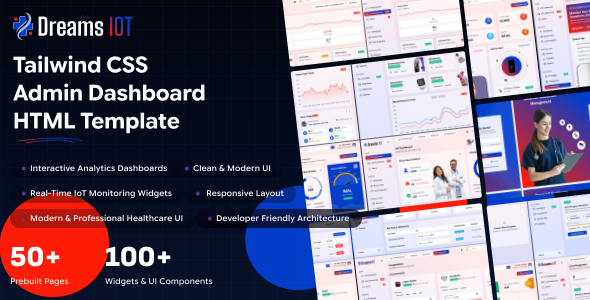
Dreams IOT is a modern, responsive enterprise administration dashboard template designed with Tailwind CSS. Streamline hospital operations, monitor patient vitals, track medical devices, manage appointments, and gain actionable insights through a modern Tailwind CSS powered IoT healthcare dashboard.
Dreams IOT offers One powerful dashboard variations and 10+ fully functional, prebuilt application modules with a clean, modular structure.
Prebuilt Applications
- IOT Dashboard & Live Monitoring
- Patients , Devices & Data
- Ai & Tools, Mobile app
- Authentication & Error pages
- UI Interface
Layout & Mode Features
- 3 Prebuilt Dashboard Variations
- Multiple Sidebar Layout Options
- Full responsive design (Mobile, Tablet, Desktop)
- Full RTL Layout Direction Support
- Layout Direction Variations
Project Overview
The project follows a modular structure with clear separation of concerns.
angular/
├── public/                		 		# Static assets (favicon, images, etc.)
├── src/
│   ├── assets/            		 		# Images, icons, styles (css/)
│   ├── app/
│ 	│	├── core/          		 	# models,routes,services
│   │   └── features/ 	   		 		# Main pages Directory
│	│   │   ├── auth/  			 	# Authentication pages
│	│   │   ├── error/  		 		# Error pages
│	│   │   ├── Pages/           			# Pages Modules,routes
│   │	├── layouts/			 		# Common header , footer components
│   │	├── shared/				 	# Shared Components
│   │   ├── app.config.ts/
│   │   ├── app.html/
│   │   ├── app.routes.ts/
│   │   ├── app.css/
│   │   └── app.ts/
├── editorconfig
├── gitignore
├── angular.json
├── package.json
├── tailwind.config.js
├── README.md
├── tsconfig.app.json
├── tsconfig.json
└── tsconfig.spec.json
Node.js and NPM :
If NodeJS is not installed then download it from https://nodejs.org/. NPM comes bundled with Node.js. Recommended version: Node.js 24.0.0Angular-cli :
You can install angular-cli by executing from your command windownpm install -g @angular/cli. More details can be found here https://github.com/angular/angular-cli
If you have Angular CLI installed previously, update it to the latest Angular CLI. Remove the older version and re-install it.
npm uninstall --global @angular/clinpm install --global @angular/cli@22NPM Packages
- Before proceding you'll need to install npm packages. You can do this by running
npm installfrom the root of your project to install all the necessary dependencies.
npm install
Development Server
- Run
ng servefor a dev server. Navigate to localhost:4200/. The app will autometically reload if you change any of the source files.
ng serveBuild Project
- Run
ng buildto build the project. The build artifacts will be stored in thedist/directory. Use the--prodflag for a production build.
npm install -D tailwindcssnpx tailwindcss init -pEdit 'tailwind.config.js' and update the content paths as follows:
 /** @type {import('tailwindcss').Config} */
module.exports = {
  content: [
    "./src/**/*.{html,ts}"
  ],
  theme: {
    extend: {},
  },
  plugins: [
    require('@tailwindcss/forms'),
  ],
}
Install the Preline package to add interactive UI components and utilities for Tailwind CSS in the project.
npm i prelineUpdate the tailwind.config.ts
/** @type {import('tailwindcss').Config} */
module.exports = {
  content: [
    "./src/**/*.{html,ts}",
    "./node_modules/preline/dist/*.js" --> Add this
  ],
  theme: {
    extend: {},
  },
  plugins: [
    require('@tailwindcss/forms'),
  ],
}
Build
Run the build command to generate the production-ready output in the dist/ directory:
ng buildDeployment
Deploy the dist/ folder contents to your web server. The build output contains all compiled files.
The default font is Inter. To change the font:
Update the @import URL and the --font-family-primary variable in style.css:
@import url('https://fonts.googleapis.com/css2?family=Google+Sans+Flex:opsz,wght@6..144,1..1000&display=swap');

// Font Family
--font-family-primary: "Google Sans Flex", sans-serif;All theme colors are defined as design tokens under the @theme directive in your src/assets/css/style.css file. These variables control the look and feel of components:
@theme {
    --color-primary: #0F766E;   /* primary color */
    --color-secondary: #2563EB; /* secondary color */
    --color-success: #059669;   /* success states */
    --color-warning: #D97706;   /*  warnings */
    --color-danger: #B91C1C;    /*  error states */
}
Changing Element Colors
You can customize the color of any element by editing its class or variable assignment in the CSS file. For example, changing the header topbar background color:
.navbar-header {
    @apply bg-(--topbar-bg);
}How it Works
Dark mode is controlled by a theme attribute/class on the root element. When activated, all design tokens are overridden to dark variants.
The theme is controlled by the data-theme attribute on the <html> element:
<html lang="en" data-theme="dark">Dark mode styles are defined in the [data-theme=dark] block in style.css:
[data-theme=dark] {
	--color-dark: #E6E6E6;
	--color-light: #131214;
	--color-white: #090212;
}To enable Right-to-Left (RTL) layout, add the dir="rtl" attribute to the <html> tag:
<html lang="ar" dir="rtl">Tailwind CSS handles RTL layout transformations automatically when the dir attribute is set. All margin, padding, and positioning utilities adapt to the RTL direction.
RTL Demo
An RTL demo page is available at layout-rtl in the HTML version for reference.
The default layout features a full vertical sidebar on the left, a horizontal topbar at the top, and the main content area. This is the standard layout used across all dashboard pages.
- Full-width sidebar with navigation menu, logo, and user profile
- Top header with search, notifications, and user actions
- Responsive - sidebar collapses to overlay on mobile devices
The mini sidebar layout collapses the sidebar to show only icons, providing more space for the main content area. Users can toggle between expanded and collapsed states using the sidebar toggle button.
- Collapsed sidebar showing only menu icons
- Hover to expand and reveal full menu text
- Toggle via the hamburger button in the topbar
Dreams AI includes 24+ UI components. Click on any component below to view its demo page.
Dreams AI is developed by Dreams Technologies and is available under both Envato Extended & Regular License options.
Regular License
Usage by either yourself or a single client is permitted for a single end product, provided that end users are not subject to any charges.
Extended License
For use by you or one client in a single end product for which end users may be charged.
What are the main differences between the Regular License and the Extended License?
If you operate as a freelancer or agency, you have the option to acquire the Extended License, which permits you to utilize the item across multiple projects on behalf of your clients.
| NAME | URL |
|---|---|
| Tailwind | https://tailwindcss.com/ |
| Tabler Icons | https://tabler.io/icons |
| Fontawesome | https://fontawesome.com/ |
| Google Fonts | https://fonts.google.com/ |
| Apex charts | https://www.npmjs.com/package/ng-apexcharts |
| Range-Slider | https://refreshless.com/nouislider/ |
If you have any questions or run into issues with the template, feel free to contact us via email at support@dreamstechnologies.com.
Response Time: Typically 12–24 hours on weekdays (GMT+5:30). Support covers template bugs, errors, and standard features. It does not cover custom installations or custom coding changes.
Contact SupportDo you need custom development for your application?
If you need customization, new page integration, feature setups, or database connections, our engineering team can help tailor this template to your precise specifications.
- Tailoring features to your exact branding and workflow.
- Deploying the template to your production servers.
- Integrating backend endpoints and databases.

Thank You
Thank you for choosing **Dreams IOT**! We hope this template facilitates building your application. We kindly ask you to share your feedback by leaving a rating on ThemeForest.
Leave a Review